An advanced version of the WordPress Recent Posts widget, allows display of thumbnails, post excerpt, author, comment count, and more. Provides options to trim the title and override the post order and type. Also includes a simple template parser so you can override the default output.
Download: http://wordpress.org/extend/plugins/recent-posts-plus
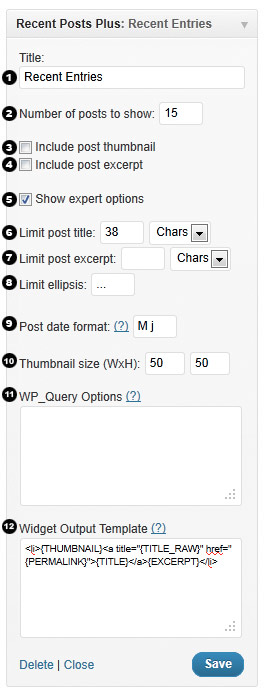
1: Title
Default: Recent Posts
This field sets the title of the widget. It works the same as every other widget.
2: Number of posts
Default: 5
Changes how many posts are displayed in the widget. Enter ‘-1′ to display all posts.
3: Include post thumbnail
Default: no
Displays the post thumbnails of each post.
If this option is hidden you may not have a theme with post-thumbnails enabled. You can manually enable and add post-thumbnails to each post or you can download the Default Thumbnail Plus plugin automatically display a default image.

4: Include post excerpt
Default: no
Displays the post excerpt of each post.
5: Show expert options
Default: no
Show/hide the expert options panel. These options should be used with more care.
6: Limit post title
Default: (no limit)
Limits the numbers of characters or words to display of each posts title.
Example: For the post title “Look at this title” setting this option to 7 chars would result in “Look at…”
7: Limit post excerpt
Default: (no limit)
Limits the numbers of characters or words to display of each posts excerpt.
8: Limit ellipsis
Default: …
Sets the string to append to post titles or excerpts that have been shortened.
9: Post date format
Default: M j
Sets the PHP date format to use when displaying the post date.
See http://php.net/manual/en/function.date.php for overview of the options available.
Note: the date format can be overriden in the output template, which allows for multiple date formats in one entry, see section “12: Widget output template”.
10: Thumbnail size
Default: 50 x 50
Sets the size of the post thumbnail in pixels.
11: WP_Query options
This is an advanced option that modifies what posts are shown in the widget. This option specifies extra arguments to use in the WP_Query request and as such is very flexible even allowing this widget to show pages rather than posts, show oldest posts first, or filter posts by tag or category. The WP_Query options must be specified in valid JSON format (validate here http://jsonlint.com/).
These are the default args that are sent to WP_Query:
{
"post_type": "post",
"posts_per_page": <same as Number of posts setting>,
"orderby": "date",
"order": "DESC"
}
List of options:
{
"post_type": "post", //post, page, revision, attachment, any
"post_status": "publish", //publish, pending, draft, auto-draft, future, private, inherit, trash, any.
"posts_per_page": "5", //overrides number of posts setting
"offset": "3", //number of posts to skip over
"post__in": [2, 3, 4], //only show posts 2, 3 and 4
"post__not_in": [2, 3, 4], //exclude posts 2, 3 and 4
"ignore_sticky_posts": "1", //ignore sticky posts or not. Default value is 0, don't ignore (requires WordPress 3.1+).
"caller_get_posts": "1", //ignore sticky posts or not. Deprecated as of Version 3.1 in favor of 'ignore_sticky_posts'.
"author": "1", //author ID
"author_name": "john", //post author's name, use 'user_nicename' (NOT name)
"orderby": "date", //none, ID, author, title, date, modified, parent, rand, comment_count, meta_value, meta_value_num
"order": "DESC", //ASC or DESC
"tag": "cooking,baking", //display posts that have "either" of these tags
"tag": "bread+baking+recipe", //display posts that have "all" of these tags
"tag_id": "13",
"cat": "1, 2, -3", //category ID 1, 2 but not 3
"category_name": "articles,news",
"year": "2011",
"meta_query" : [] //see below
}
For a full listing see http://codex.wordpress.org/Class_Reference/WP_Query
Ordering by custom fields
You can change the sort order to be based on a specified custom field using meta_value and meta_value_num as the orderby option.
Note: The difference between meta_value and meta_value_num is that the meta_value_num is sorted as a numeric value (i.e. meta_value would be ordered as a string e.g. 1, 3, 34, 4, 56, 6 whereas meta_value_num would be 1, 3, 4, 6, 34, 56).
The following example would order posts by custom field rating showing in order of highest rated to lowest rated.
{
     "meta_key": "rating",
     "order": "DESC",
     "orderby": "meta_value_num"
}
Utilizing the meta_query option
Note: This option requires WordPress 3.1+
Filter or show posts with a certain custom field value using the meta_query option.
The following example would display posts with a custom field called mood with a value of happy:
{
    "meta_query": [
        {
           "key": "mood", //Custom field key
           "value": "happy", //Custom field value
           "type": "CHAR", //Custom field type. Possible values are 'NUMERIC', 'BINARY', 'CHAR', 'DATE', 'DATETIME', 'DECIMAL', 'SIGNED', 'TIME', 'UNSIGNED'
           "compare": "=" //Operator to test. Possible values are '=', '!=', '>', '>=', '<', '<=', 'LIKE', 'NOT LIKE', 'IN', 'NOT IN', 'BETWEEN', 'NOT BETWEEN'
        }
    ]
}
The following example would display posts if they have a custom field rating of between 5 and 10 or if they have a custom field mood with a value of happy:
{
    "meta_query": {
        "relation": "OR", //Possible values are 'AND', 'OR'
        "0": {
            "key": "rating",
            "value": [5, 10],
            "type": "NUMERIC",
            "compare": "BETWEEN"
        },
        "1": {
            "key": "mood",
            "value": "happy",
            "type": "CHAR",
            "compare": "="
        }
    }
}
12: Widget output template
This is an advanced option that modifies the output of the widget. You can modify the output with template tags and add custom classes or tags for styling.
By default the widget outputs posts in this format:
<li>
{THUMBNAIL}
<a title="{TITLE_RAW}" href="{PERMALINK}">{TITLE}</a>
{EXCERPT}
</li>
You can modify the output by including the following template tags:
{ID} The post ID
{THUMBNAIL} The post thumbnail IMG tag if it exists, otherwise nothing
{TITLE_RAW} The post title
{TITLE} The post title, will be trimmed if it exceeds "Option 6: Limit post title chars"
{EXCERPT_RAW} The post excerpt
{EXCERPT} The post excerpt, will be trimmed if it exceeds "Option 7: Limit post excerpt chars"
{PERMALINK} The post permalink url
{DATE} The post date, the format is defined by the "Option 9: Post date format" setting
{DATE[php_date_format]} As of 1.0.4: Customized date format which overrides the default date format setting. E.g. {DATE[l jS F Y]} would display like "Monday 1st January 2011"
{AUTHOR} The post author name
{AUTHOR_LINK} The post author website url
{AUTHOR_AVATAR} As of 1.0.7: Displays the author's avatar if available
{COMMENT_COUNT} The total number of comments, Trackbacks, and Pingbacks for the post
{META[name]} As of 1.0.5: Displays the value of the specified custom field. E.g. {META[Currently Reading]} or {META[Rating]}. Note: Only returns the first result.
{ELLIPSIS}...{/ELLIPSIS} As of 1.0.9: Overrides option "8: limit ellipsis" for the excerpt.
                         You can use other templates tags within the {ELLIPSIS} tags but not PHP and it will only be appended to the excerpt if it is truncated.
                         Example: {ELLIPSIS}... <a href="{PERMALINK}">(more)</a>{/ELLIPSIS}
Using raw PHP in the Widget output template
As of 1.0.7 you can add raw PHP code to the widget output template.
Note: This will require the PHP code you enter to be run though eval which will likely have a small performance penalty. However if you don't enter any PHP code eval will not be run. Be careful not to give untrusted users permission to modify widget settings since it could be a potential security risk.
The following example displays the author's avatar at 32px size:
<li>
<?php echo get_avatar(get_the_author_meta('user_email'), 32); ?>
<a title="{TITLE_RAW}" href="{PERMALINK}">{TITLE}</a>
{EXCERPT}
</li>
You can access some of the existing template tag values with the $widget_ouput_template_params array e.g. $widget_ouput_template_params['{ID}'] contains the current posts ID.
Examples of Styling the Output
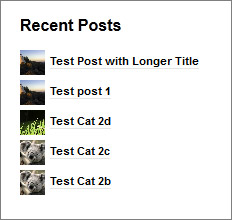
The look of the widget output depends a lot on what theme you are using. By default the output looks somewhat like the image below. Thankfully we can improve this with very little effort and a few additions to your themes stylesheet.
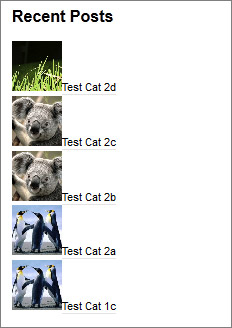
The first thing you need to do is go to Appearance -> Editor and select the Stylesheet option on the right (it should be selected by default but just make sure). After that paste one of the following styles at the bottom of the stylesheet depending on the look you want.
Note these are just basic examples you can do a lot more with more with CSS. These examples also depend a lot on the theme you are using, more complex themes may require additional styling. Hopefully these examples can point you in the right direction.
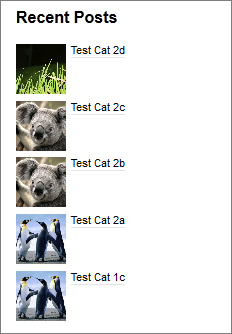
.widget_recent_entries li {
    clear: both;
    margin: 5px 0;
}
.widget_recent_entries .wp-post-image {
    vertical-align: text-top;
    margin: 0 5px 0 0;
}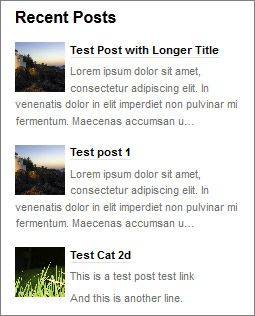
.widget_recent_entries li {
    clear: both;
    margin: 15px 0;
}

.widget_recent_entries .wp-post-image {
    float: left;
    margin: 0 5px 0 0;
}

.widget_recent_entries li p {
    margin-top: 5px;
    color: #707070;
}
.widget_recent_entries li {
    clear:both;
    margin: 5px 0;
}

.widget_recent_entries .wp-post-image {
    vertical-align: middle;
    margin: 0 5px 0 0;
}
The above example has the thumbnail size set to 25px x 25px.
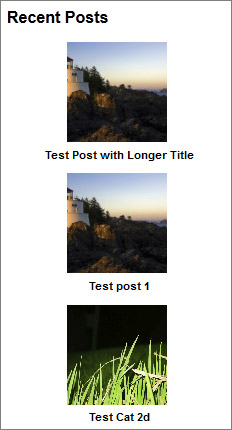
.widget_recent_entries li {
    clear:both;
    margin: 10px 0;
    text-align: center;
}

.widget_recent_entries .wp-post-image {
    margin: 0 5px 0 0;
}

.widget_recent_entries li a {
    display: block;
}
The above example has the thumbnail size set to 100px x 100px.
Hi,
I went through and added a second date field so you can separate formats, like month on top and day on bottom. Like http://yourwebsiteforless.com/mysite2/ in right sidebar.
I can send it over if you want it.
Thanks,
Hi CJ that would be great if you can send it through I will incorporate it into the next update.
Also that way you won’t have to hack every revision. Let me know if there are any other fields you might need.
Hi CJ I just updated the plugin to v1.0.4 and added a custom date format feature. This should be more flexible than just adding extra date format fields as it allows for any number of custom date formats.
How it works is specifying {DATE} in the template will display with the date format defined in section 9 “Post date format”. However you can override this by using {DATE[php_date_format]} and specify your own custom format.
So you could do {DATE[M]} to display “Aug” and {DATE[d]} to display “15” which is the day of the month.
Awesome, that works better then what I did. The only other field I am having to create is a read more link. Awesome plugin by the way. I have been looking for something like this as I have a client that continually uses a similar format to what is in that site, and I was having to write it out by hand each time so I was about to create a plugin for it but you saved me lots of time :). Thanks a bunch.
Do you accept donations?
You should be able to create the read more link with the existing options.
Like this:
<li>{THUMBNAIL}
<a title="{TITLE_RAW}" href="{PERMALINK}">{TITLE}</a>
{EXCERPT} <a href="{PERMALINK}">Read more</a>
</li>
Actually looking at your site I would suggest something like this:
<li class="news"><div class="inthenews">{DATE[M]}<span class="date">{DATE[d]}</span></div>
<div class="news-content"><a title="{TITLE_RAW}" href="{PERMALINK}"><strong>{TITLE}</strong></a>
<p>{EXCERPT} <a href="{PERMALINK}">Read more</a></p>
</div>
</li>
I think it makes more sense semantically to use <LI> rather than <DIV> as the container since you are representing a list of items (in this case posts).
Awesome.. Thanks for your help!
Thank you for such a great plugin. I want to thank you specifically for making it so easy to change the way the output displays. Instead of having to figure out what the names of the CSS styling are and where the heck the files are, you’ve included the code right within the settings. Yippee! Oh, how I wish every plugin did that!
I would like to add a “Read More” text below the excerp. How can I do that? Please help.
The website address is http://sevendwarfspreschool.ca/setup/
Hi Cnng,
See my above comment you can do it by adding the code below to the Widget output template
<a href="{PERMALINK}">Read more</a>Edit: Looks like you already figured it out and updated your site.
Very good plugin! YEAH! Thanks!
I’m obviously not understanding how to edit the WR-Query options. If I have nothing in the box, EXACTLY what do I put so that the sticky posts are not shown?
Thanks — it’s doing exactly what I want otherwise. I was able to customize the output as I wanted, just not the query.
Hi Carolyn,
To modify the WP-Query to remove sticky posts you enter this:
{"ignore_sticky_posts": "1"
}
To make the thumbnail a link just do this:
<a title="{TITLE_RAW}" href="{PERMALINK}">{THUMBNAIL}</a>I haven’t had a chance to try it since I’m on my phone but it should work fine.
Sorry, one more question .. .
What would the output code look like to make the thumbnail clickable? I feel like I should be able to figure it out on my own, but I’m not getting it.
Thanks!
Patrick —
Thanks for the really fast response. The clickable image works perfectly.
The ignore sticky posts is still a problem. That’s what I entered originally, and I copied and pasted your code. I still get the sticky. My theme is Atahualpa — is that by any chance causing the problem? Is there another place to put the code, maybe in the plugin file?
Thanks for helping, I really appreciate it!
Carolyn
Strange I doubt it is the theme, try removing the quotes from the value like this:
{"ignore_sticky_posts": 1
}
Here is the documentation for that option from the WordPress Codex, note it will still show the stickied post but it won’t place them at the beginning. If you are looking to exclude those posts then use “post__not_in”.
I’m away on business until Monday so I can’t really test anything on my end until then.
It’s still showing at the beginning of the list (it was one of my first posts, not at all recent). No problem with waiting until you’re back.
Thanks for the help!
C
I will figure out what the issue is when I get back.
Just a little thing what version of WordPress are you running? The ignore_sticky_posts option was added in WordPress 3.1
That’s a sensible answer to a chegnanlilg question
J’en avais deux dans mon salon, mais après une visite chez Ikea, j’ai complêtement redécoré – beaucoup mieux comme ça Sérieusement, au musée d’art Canadien à Toronto dans le cadre de Contact l’an passé si ma mémoire est bonne.
That explains it. I’m on 3.0.1. Could I use the post_not_in to exclude it (it’s the only Uncategorized post I have . . .)? If so, what would be the code?
Second question . . . any chance you’d ever write a “matching” widget for random posts? I’d love to have one to highlight older content (most of mine is evergreen) but want it to have consistent styling with the recent posts.
Thanks for figuring out the problem when you’re off doing other stuff!
The code prior to WordPress 3.1 to ignore sticky posts is:
{"caller_get_posts": 1
}
To make it into a random posts widget just add:
{"orderby": "rand",
"caller_get_posts": 1
}
Thanks so much! The caller_get_posts works perfectly.
I’m going to have to work a little on the random posts as it’s not formatting correctly (it may be that some of the older posts don’t have the featured image and excerpt set, have to check . . )– but that’s going to be in a day or two as I’m working on a deadline for another project today and tomorrow.
Thanks again and I’m sending a small donation!
I am too new at all this and have never had anything to do with web design before. Anyway I have just set up my website and really like this pluggin however when i click to read onw of the recent posts the pluggin itself then shows a lot of coding in the sidebar (I apologise if i am being completely stupid) however i would greatly appreciate if someone could tell me how to fix this. Thanks so much
Hi Stacie,
Sure I can help you that is no problem but I will need some more information.
What version of WordPress are you running?
Edit: Just saw the problem on your website (jsrcharteredaccountants.com). It seems to be an issue with your theme (zeeBusiness) I’m going to do some testing and will post back here when I figure out the issue.UPDATE: The issue is caused by a conflict with the Sharebar plugin. You can temporarily fix the issue by unchecking the “Include post excerpt” option.
Basically the Sharebar plugin is adding code to the post excerpt but the tags are getting stripped so it is just showing the code in plain text. Due to limitations with the way WordPress handles post excerpts this could be a little tricky to fix on my end but I will have another look.
We can’t get the “Expert Options” to work on our site. We’re using WP 3.2.1 with the Genesis Theme Framework. Regardless of the query options we use, we get the same results, the most recent 5 posts. We want to display just one author’s posts or just one category of posts. Here’s the query code:
{
“cat”: “35”,
“posts_per_page”: ,
“orderby”: “date”,
“order”: “DESC”
}
The category has exactly 4 posts in it. All are the most recent posts. When displaying it includes those posts plus the next most recent post in another category. When changing the category ID to a category with five entries we still get the most recent 5 entries and none of the older posts in the other category.
The same holds for “author”. We get the same 5 most recent posts as results including posts from different authors. Here’s the page where we’re using your plugin
http://www.leanproject.com/who-we-are/people/hal-macomber/
Any advice?
Thanks,
Hal
Weird, when I pasted the code above it didn’t include the value for posts_per_page.
Here’s the correct query code
{
“cat”: “35”,
“posts_per_page”: ,
“orderby”: “date”,
“order”: “DESC”
}
Hi Hal,
Try just this to set the category
{"cat": "35"
}
and this to set the author:
{"author": "1"
}
Or you can do both like this:
{"author": "1",
"cat": "35"
}
Also try posting your WP_Query code into http://jsonlint.com/ to make sure it is in valid JSON format, it looks like you have an invalid quote character.
Then you can change the number of posts with option “2: Number of posts to show”
Thank you I appreciate your help on this (To be honest this is all totally new to me) My version is WordPress 3.2.1. Thank you again. I have unchecked that box but I had quite liked the ‘preview’ showing but at least this fixes it temporarily
Regards Stacie
Hi Stacie please update to version 1.0.5 the conflict with Sharebar should be fixed now.
Patrick, replacing the invalid quote character did the trick. Love the control your plugin provides! Thanks.
Look for a donation!
Hey Patrick. Love this plugin and it’s doing exactly what I need! On my homepage I have a widget that only displays one post at a time – my most recent. However I would also like to make past posts sticky so they go to the top and are a featured post from the past. However when I make an old post sticky the widget populates with two posts (even though I’m only telling it one), the sticky post on top and the most recent on the bottom.
Is there any way I can have only one displayed at all times, even when using sticky posts? Any help would be much appreciated.
Hi Jordan,
If I understand correctly you want to feature just one post from the past. I will have to test if there is an issue with the way WordPress handles sticky posts.
But you could achieve what you want by adding this to the WP_Query setting where 7 is the post id that you want to feature.
{"ignore_sticky_posts": "1",
"posts_per_page": "1",
"p": "7"
}
I love the control your plugin offers! It’s excellent! Do you have any plans to include options for displaying custom fields? Our site does reviews and we keep the score (ie: 8/10) in a custom field called “rating”. It would be great to be able to show that next to the title.
Thanks for the donations everyone.
Great idea Barbara. I will have a look at doing that for the next update.
I will also look at documenting the WP_query options that relate to custom fields.
You can do stuff like showing just posts that have a rating greater than 5 or display a list of posts ordered by rating.
Hi,
I am trying to find why there is an extra < at the beginning of the read more elipse on http://www.insideperformance.ca/clinicscamps/ sidebar only on the first post excerpt. Any ideas?
Thanks!
Hi CJ,
Can you post the code you are using for the “Widget output template” and if possible the source of the “General Skills Clinic” post.
Is it possible to align the text around the thumbnail image?
Yes that should be no problem but it has to do with css styles rather than the plugin code see http://codex.wordpress.org/Wrapping_Text_Around_Images
Hey updated to 1.0.5.
Hi Patrick,
I noticed the excerpts now strip the paragraph tags. My excerpts looked alot better before with the line breaks. Any way this is controllable? Also does it strip hyperlinks? Let me know Thanks!
Hi Jordan,
Yeah that was a bug introduced in 1.0.5 I just fixed it then and updated the plugin. The output should now be the same as 1.0.4. Also FYI all tags are stripped except for A, P and BR.
Looks just what i am looking for….is it compatible with 3.2.1
Hi Judd,
Yes it is compatible with 3.2.1. That is what I am running it on myself.
Can you include a default thumbnail if no thumbnail is available?
Unfortunately no that would be outside of the scope of this plugin. But I am writing a plugin which will improve post_thumbnail functionality and let you chose default thumbnails based on category, tags etc.. And also help migrate over by using the first attachment as a thumbnail or load thumbnail based on meta key value.
Hi. A newbie question. I would like to put “posted by” before the author’s name, after the ellipse, but have now idea how to do even such a simple thing. I can insert {AUTHOR} after {EXCERPT} and it works fine, but would like to add that bit of text in.
Your widget works brilliantly. Thank you.
Hey, I did it, and even added a bit of color, and put the excerpt on a new line. I love this stuff, it’s better than doing puzzles in the newspaper. know it’s elementary for you guys, but here is what I ended up with
{THUMBNAIL} {AUTHOR} on <a title="{TITLE_RAW}" href="{PERMALINK}" rel="nofollow">{TITLE}</a>. {EXCERPT}Oh, those cookies look so delicious! I want one right now!!I actually made a new-to-me raw dessert last night from Matthew’s book, Everyday Raw– it was a lemon cheesecake tart! So good. Thank goodness I only made half the recipe, because it’s almost gone already!!Love seeing all your raw food creations! That cheese looks like the real thing!
I’m afraid that didn’t post correctly: maybe it interpreted the code. Perhaps you could sort that out for your other readers.
Glad you worked out the problem. Fixed your comment as well.
Hi
How do I query for a taxonomy? The WP_Query codex explains that it now must be done with an array. I understand the codex but I am unsure how to adopt the syntax according to your example above.
Cheers Jack
PS I tried the following but it didn’t work.
Hi Jack,
I assume you are running WordPress 3.1+. The syntax of your query is correct and it is in valid JSON format. The issue seems to be that the tax_query setting is supposed to be in a slightly different format to what you provided.
Try something like this:
For future clarification to handle multiple taxonomies you would do something like this (based on example from the WP_query docs)
Do you think Socialist or Liberals are educated into their thinking or perhaps are more born that way?Considering myself (an unread liberal), I tend to instinctivley gravitate to liberal ideals. It seems ingrained in me. There does not seem to b a collective thought in my bodyDave
I need to insert a break after the title – right now there is no space between the title and the post. This may be because the columns for the posts are 180px. Can you point me to the correct area of the code to insert the break? I’m familiar with PHP.
I need to insert a break after the title, just before the post. Where in the code should I look? I’m pretty familiar with PHP.
Hi Ginny,
Just change your “Widget output template” option to something like this.
<li>{THUMBNAIL}<a title="{TITLE_RAW}" href="{PERMALINK}">{TITLE}</a><br/>{EXCERPT}</li>Hi
I trying to use yout plugin on my test site:
test.darken.pl
But i want to use it three times on homepage.
I’m trying to show each choosen category – it works, but when i’m using code for showing category, a post count won’t work.
So for example i put in each widget this code:
and
and
When i do something like this:
post count work, but it show only newest posts.
Hi Jacek,
The following example is invalid JSON you need to remove the comma (,).
Otherwise you could try overriding all the default settings like this:
Yes, I know it is invalid, but i just describe a situation when post count work.
I tried your code to override default settings, but it isn’t working.
Ok, so problem is:
When I put “cat” or “category_name” in wp_query options box then post count don’t work.
That is strange it works fine on my test server. You could try using category__in instead.
If that doesn’t work either can you let me know your WordPress version and if possible the theme you are using so I can do some further testing.
Thanks! Got it. Now I need to show a thumbnail. In my version of the widget, there is no option for the photo or the thumbnail size, although it does show up in the advanced settings. It’s in there; however no thumbnail shows up. Can you help?
Do I have to upgrade to version 1.0.6? If so, do I have to delete the old version and start over?
The reason the thumbnail options wouldn’t be appearing is because your theme doesn’t support the new post_thumbnail setting. You can add support for this feature by adding this code to the themes functions.php file:
If you are using version 1.0.4 of the plugin then there is no reason to update other than some new options. However if you are using 1.0.5 I would recommend updating since 1.0.6 has a couple of bug fixes. You can see the change log here http://wordpress.org/extend/plugins/recent-posts-plus/changelog/. BTW you don’t have to delete the old version just overwrite the files from the old version and your current settings will remain.
Thank you for your response. I am working with the Prestige theme and It is not very cooperative. I did ad the functionality to the functions.php file, but it is still not working. I may be at the end of the road, but appreciate any ideas you have.
Sorry to hear it still isn’t working are the thumbnails options still not showing? As long as you have WordPress 2.9+ and the theme supports post_thumbnails then it should work. I can’t test it with your theme since there isn’t a free version available but occasionally some complex themes can cause issues (although they shouldn’t since the plugin only uses basic core functions).
I will stay at it. This theme does not play well with others, IMO.
Hi,
any chance I could use the posters (Gr)avatar?
Hi David good suggestion I have updated the plugin with this option. Update to 1.0.7
1.0.7 changelog:
Permalink issue: I’m using widget in 3 separate columns in a sidebar. Each column has a different post in it. When I mouse over the links, they show the correct post link; however when I click on the link, it takes me to the most recent post every time. Any ideas?
Sounds like a strange issue you are having is there any possibility you could send me a link to the page?
What are you using for the widget output template?
Wow, thanks for that. I found that ‘{author-avatar}’ was a bit big, so used the php styling you have suggested, reduced the avatar size to 20 (to match “decent comments” plugin) and added ‘{author]’. Then a couple of line breaks at the end, and it looks great.
I hope that code comes out legibly!
I have not posted the site yet – posted locally. I’m using A F PW to display the most recent post on the top content area. Below it is another content area with 3 columns, each showing the next most recent post. All that works well on the home page and when mousing over the link, the correct URL shows.Here are my settings:
{"offset": "1"
}
<a title="{TITLE_RAW}" href="{PERMALINK}" rel="nofollow">{TITLE} {AUTHOR} {DATE}</a>{EXCERPT}<a href="{PERMALINK}" rel="nofollow">Read more</a>I’m using a custom single.php page; here’s the code that receives it:
                        <strong>Widget Ready</strong>

                        This single is widget ready! Add one in the admin panel.
<!--END content DIV-->
So the problem is that I need to use this page for all posts and without additional code, it refers back to the main post. It looks like I need to add some conditional statements that call the next most recent post from column 1, and so forth. Would that code go in the advanced-fpw.php? and if so, where?
So that single.php code did not come out. here it is:
<?php if (function_exists('dynamic_sidebar') dynamic_sidebar('Single')) :
I think I know what your problem is actually. Are you using 1.0.7? There was a problem when I sent the updated plugin through which I rectified immediately, you would have had to check for updates almost at the same time I sent the update, which is really unlucky . Anyway just update manually with this zip http://downloads.wordpress.org/plugin/recent-posts-plus.zip and the issue should go away.
Otherwise if you are still having issues I am not sure I recreated your set up as best I could and didn’t have any problems.
Firstly, this is the best custom widget ever! I concur with Barbara, I would love to display custom fields in the widget. We often have multiple authors and I haven’t been able to figure out the WP_Query or display to make it recognize co-authors plug-in or even better just list what I put in a custom field called “recent_posts” instead of authors. Right now, I’m adding the authors names to the excerpt and it looks silly. But lo, I cannot publish without all of the authors names
Hi Misty,
Custom Field support was added in version 1.0.5 just add the following tag to your Widget output template: {META[recent_posts]}
{META[name]} Displays the value of the specified custom field. E.g. {META[Currently Reading]} or {META[Rating]}. Note: Only returns the first result.You should be able to use the raw PHP support that was added in 1.0.7 to utilize the co-authors plugins template functions.
For example (note I based this on the co-author plugin documentation it should work for this http://wordpress.org/extend/plugins/co-authors/ or this http://wordpress.org/extend/plugins/co-authors-plus/ plugin):
Excellent plugin, thank you.
Thanks Dave
Hi Patrick, This plugin exhibits one bit of weird behavior which is that if you exclude a category from displaying in the widget, then when you visit that category page the widget does not show any links at all. Any thoughts? Thanks.
Hi Jonas,
I am trying to recreate your problem on my testing server but so far I haven’t been able to. So you have something like this in the WP_Query option to show all categories except one (in this example category 3):
But when you visit the category page for category 3 the links don’t show at all. Is that correct?
Can you send me a link to the page that isn’t working, and let me know what version of WordPress you are running?
On a regular post page, I want to be able to show a list of custom posts that relate to regular posts based on commonly named tags (and only where the tag names are equal)? Is there a way to extract the tags from the current regular post (e.g. using get_the_tags() or similar) and use the result in the “tag:” field of this plug-in?
Hi Wayne,
I am not completely clear on what you are trying to do.
If you are trying to dynamically modify the WP_Query param to insert a tag setting based on the displayed regular post then it can’t be done with this widget. Have a look at the section in the documentation above under “Utilizing the meta_query option”. If it can’t be done with the meta_query option then it can’t be done. The reason for this is that the WP_Query options are used before the “Widget output template” is parsed so changing it in that way is outside the scope of this widget.
If you are trying to display a list of regular posts, then under them display related posts you could insert PHP code into the “Widget output template” to do this.
However as much as I would like to say this widget can do all the things you want I think it would be a lot easier to just write a bit of custom code and stick it into; your theme, a custom widget, or into a PHP widget (however this last option would be slower since the code would have to be evaled).